تعديل

Affichage des articles dont le libellé est macs. Afficher tous les articles

samedi 6 septembre 2014

Mac News: The Week in Review: August 29, 2014

Apple Sends Invites for September 9thMedia Event

It's finally official. Apple has invited the media to a special event on September 9th, where the iPhone 6 and iWatch are expected to be announced. The press event will be held at De Anza College's Flint Center for the Performing Arts, starting at 10:00 a.m. PDT… Read more.

iWatch Not Likely to Ship Until 2015

Although many pundits are expecting Apple to show off the iWatch at the upcoming September 9th media event, few expect the device to be available for order, or ready to ship until very late in the year, or even not until early 2015.
The reason given for the expected late shipment is that so far, there have been no image or part leaks for the iWatch, nor any indication that any manufacturing facility has started to ramp up for production of a wearable Apple device. This lack of leaks and production clues indicate that either major production hasn't started yet, or the iWatch is the best-kept Apple secret in quite a long time… Read more.

Apple Plans Appeal of Blocked Injunction Against Samsung Products

Electronista is reporting that Apple will appeal a ruling from earlier in the week, which denied a permanent injunction that would have prevented Samsung's Galaxy 5 III and Galaxy Note II from being sold in the U.S.
It's not clear why Apple is pursuing the injunction, since both of the products are older models that for the most part aren't being sold in the U.S., at least as new models… Read more.

iTunes Festival London Starts September 1

This year's free, month-long iTunes Festival London is scheduled to start September 1st at 4:00 P.M. EDT, with deadmau5 kicking off the first day's concert. Apple will stream the entire month of free music via iTunes and Apple TV… Read more.

iPhone 6 Expected to Include NFC-Based Mobile Payment System

Mac Rumors is reporting that leaked images of the iPhone 6 circuit board include an NFC (Near Field Communication) chip that will likely be used in a mobile payment system to be offered by Apple.
Such a system would allow iPhone 6 users to purchase products by bringing their phones near a payment terminal…Read more.

Rumor Roundup for the September 9th iPhone Event

With a little bit more than a week to go untilApple's September 9, 2014 media event, I thought it would be fun to bring together many of the rumors surrounding the event and the products that may see the light of day.
Remember that aside from the date and time of the media event, everything else is just rumors.
iPhone 6: Let's start with the most obvious rumor, which is that Apple will announce the iPhone 6. I think we can put this rumor down in the "Yup, it's going to happen" camp. But even so, there are rumors within rumors that need to be addressed.
Sam Costello, our iPhone expert, has an interesting write-up on the iPhone 6 rumors, so I'm going to send you over to his site to get the lowdown, but be sure to come back here for more rumors:
iWatch: The other product that's getting lots of attention in the rumor mills is the mythical iWatch. The reason I say "mythical" is because, other than Apple filing for an iWatch trademark in a few countries, there haven't been any verifiable leaks or details about the iWatch beyond what the rumor mills are producing. Sure, there are many good reasons to expect an Apple-branded wearable device that will be the host for a number of health-related sensors and devices, as well as a controlling interface to Apple's planned entrance into home automation. I just don't expect it any time soon.
To get up to date on iWatch rumors, visit Priya Viswanathan, our Mobile Devices expert:
An iWatch by any other name: The wearable device won't be called an iWatch. Apple was only able to secure the iWatch trademark in a few countries, with Swatch making a concerted effort to block iWatch applications from ever seeing the light of day because of the similarity of the name to its iSwatch watch. The easiest thing for Apple to do is give the product a different name.
iWatch won't be available until the end of the year: This shipping rumor is built around the lack of increased production activity from Apple's usual suppliers. The folks who track supply chain activity have seen increases in Apple's supply chain, but almost all of them believe the increase is due to the iPhone 6 and not the iWatch. But there are those who think the iWatch is already in production and could be ready for a September announcement.
The other reason for concern about when the iWatch will be available has to do with the glass that will be used in the device. There are three likely sources for the glass: Corning for Gorilla Glass, which could be used in an iWatch if it has a conventional wristwatch style requiring straight glass; Corning for Willow Glass, if flexible or curved glass surfaces are needed; and Apple's Sapphire glass, which is extremely scratch and dirt resistant, but may have a direct impact issue (prone to shatter) without some type of additional protective structure, such as a large bezel.
For the final word on what will be announced, we'll just have to wait until September 9th, 2014 at 10:00 am PDT.

Apple Releases Developer Preview 7 of OS X Yosemite

Apple on September 2 released the seventh version of OS X Yosemite Developer Preview. Coming roughly two weeks after the previous release, this build once again seems to contain just some UI updates in the form of new icons and name changes, and some small changes to how some UI elements are presented or work.
Apple tends not to divulge a great deal of information to its developers with each update of the Yosemite beta, and this release is no exception. Thus, all of the Mac information sites are busy trying to discover anything new in the OS.
So far, there are new icons for Disk Utility, Keychain Access, and ColorSync; at least, that's one claim, but when I look at the icons, I don’t see much of a difference from the previous versions. Perhaps it's better to say they're slightly revised rather than call them new.
The Software Update item has been removed from the Apple menu and replaced with an App Store menu item, with a badge that indicates how many updates are available.
Apple hasn't yet asked developers, or those participating in the public beta program, to test specific issues, which leads me to believe that the Yosemite development process has a good distance to go before there will be talk of final development releases and gold masters. OS X Yosemite, at this stage of the game, is still missing a few promised elements and apps, so don’t hold your breath.
I do, however, expect Yosemite to make an appearance on September 9th at Apple's upcoming media event. Apple is bound to demonstrate the new Handoff feature in Yosemite and iOS 8 at the event. The ability to be working on your Mac and then pick up your iPhone and continue from the same place, with the same apps and data, is amazing, and a real game changer.
But aside from this anticipated demonstration, we'll have to wait until mid to late fall for the release version of OS X Yosemite.

Apple Publishes HomeKit and HealthKit App Guidelines

Apple has updated its app review policy for any application that will take advantage of theHomeKit and HealthKitAPIs, to help ensure privacy and security of data.
These new rules must be met for any app using HomeKit or HealthKit to appear in Apple's App Store. The new rules specify the following:

HomeKit Rules

  • The primary purpose of apps that make use of HomeKit must be home automation services.

  • Apps that use HomeKit must indicate in their marketing materials that HomeKit is being used, and must also provide a privacy policy.

  • Apps may not use the HomeKit API to gather data for advertising or use-based data mining.

  • Any app that uses data gathered from the HomeKit API other than to improve the user experience or hardware/software performance in providing home automation functionality will be rejected.

    HealthKit Rules

    • Apps using HealthKit may only store data locally; use of iCloud for data storage will be cause for rejection of the app.

    • Apps that write inaccurate data into HealthKit files will be rejected.

    • Apps may not use data gathered from HealthKit for advertising or use-based data mining, other than health, medical, and fitness management, or for medical research.

    • Apps may not share HealthKit data with third parties without the user's consent.

    • Apps that make use of HealthKit must disclose that HealthKit is being used.

    • Apps that make use of HealthKit must have a privacy policy.

    • Apps that provide diagnoses or treatment advice, or control hardware designed to diagnose or treat medical conditions, must have written regulatory approval or the app will be rejected.

    • Apps that use HealthKit must comply with all applicable laws for the territory in which the apps will be made available.
    It should be noted that the rules for HealthKit and HomeKit usage pertain to apps that are being made available through Apple's App Store. It's possible for a developer to create a HealthKit or HomeKit app that is distributed through other channels. Such an app would not have to meet any of Apple's requirements.

  • It's clear that Apple is attempting to ensure that HealthKit and HomeKit don't become data-mining gold mines for marketing and advertising services, at least not without openly publishing the intended usage of the collected data and receiving permission from the end user.
  • There's no doubt in my mind that HealthKit and HomeKit have the potential to change how personal health and the home environment are managed. It's also clear that in order to provide these types of services, apps must acquire incredibly personal information. Appropriate safeguards must be put in place to protect us from the unintended or nefarious use of this type of personal information.
    Walking down the street and having a HealthKit app monitor my distance traveled, number of steps taken, even oxygen take-up - this I like. Seeing an ad pop up as I walk past a pharmacy, telling me it has a better deal on my specific prescriptions - not so much.

How to Fix OS X Bluetooth Wireless Problems

Chances are you use at least one Bluetooth wireless peripheral with your Mac. I have a Magic Mouse and a Magic Trackpad paired to my desktop Mac; many folks also have wireless keyboards, speakers, phones, or other devices connected via Bluetooth wireless.
After all, Bluetooth is just plain convenient, both for devices that are always connected to your Mac, and those you only use occasionally. But if the email I receive is any indication, Bluetooth connectivity can cause pull-your-hair-out types of problem when things stop working as expected.

Bluetooth Connection Issues

Most of the problems I've heard about occur when a Bluetooth device that is paired with a Mac simply stops working. It may be listed as connected, or it may not show up in the list of Bluetooth devices at all; either way, the device no longer seems to work.
Most of you have tried re-pairing your Mac with the device, or attempted to disassociate your Mac from the device. In either case, nothing changes and the two just won't cooperate.
Some of you have mentioned that the problem started when you upgraded OS X, or when you changed out batteries in the peripheral. And for some of you, it just happened, for no apparent reason.

A Possible Solution to Bluetooth Problems

A number of things can cause Bluetooth problems, but the one I'm going to address here is specific to two common connectivity problems experienced by many users:
  • Bluetooth devices that never seem to be able to pair with your Mac.

  • Bluetooth peripherals that were paired successfully, but have stopped working (they may still show up in your list of paired devices).
  • In both cases, the cause is likely to be corruption of the preference list used by your Mac to store Bluetooth devices and the current state of these devices (connected, not connected, successfully paired, not paired, etc.). The corruption prevents your Mac from updating the data within the file, or from properly reading data from the file, either of which can lead to the problems described above.
    Thankfully, the fix is an easy one: delete the bad preference list. But before you start mucking around with preference files, make sure you have a current backup of your data.

    How to Remove Your Mac's Bluetooth Preference List

    1. Open a Finder window and navigate to /YourStartupDrive/Library/Preferences.

    2. For most you, this will be /Macintosh HD/Library/Preferences. If you changed the name of your startup drive, then the first part of the pathname above will be that name; for example, Casey/Library/Preferences.

    3. You may notice the Library folder is part of the path; you may also have heard that the Library folder is hidden. That's true of the user Library folder, but the root drive's Library folder has never been hidden, so you can access it without performing any special incantations.

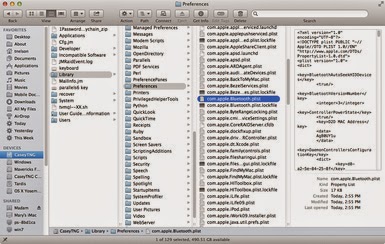
    4. Once you have the /YourStartupDrive/Library/Preferences folder open in the Finder, scroll through the listings until you find the file calledcom.apple.Bluetooth.plist. This is your Bluetooth preference list, and the file that has probably been causing the problems with your Bluetooth peripherals.

    5. Select the com.apple.Bluetooth.plist file and drag it to the desktop. This will create a copy of the existing file on your desktop; we're doing this to ensure that we have a backup of the file we're about to delete.

    6. In the Finder window that is open to the /YourStartupDrive/Library/Preferences folder, right-click thecom.apple.Bluetooth.plist file and select Move to Trash from the pop-up menu.
    7. You'll be asked for an administrator password to move the file to the trash. Enter the password and click OK.

    8. Close any applications you have open.

    9. Restart your Mac.

    Pair Your Bluetooth Devices With Your Mac

    1. Once your Mac restarts, a new Bluetooth preference file will be created. Because it's a new preference file, you'll need to pair your Bluetooth peripherals with your Mac again. In all likelihood, the Bluetooth assistant will start up on its own and walk you through the process. But if it doesn't, you can start the process manually by doing the following:

    2. Make sure your Bluetooth peripheral has fresh batteries installed, and the device is turned on.

    3. Launch System Preferences by either selecting System Preferences from the Apple menu, or by clicking on its Dock icon.

    4. Select the Bluetooth preference pane.

    5. Your Bluetooth devices should be listed, with a Pair button next to each unpaired device. Click the Pair button to associate a device with your Mac.

    6. Repeat the pairing process for each Bluetooth device that needs to be associated with your Mac.

    What About the Backup of the com.apple.Bluetooth.plist File?

    Use your Mac for a couple of days (or more). Once you're sure that your Bluetooth problem has been resolved, you can delete the backup copy ofcom.apple.Bluetooth.plist from your desktop.
    Should the problems continue, you can restore the backup copy ofcom.apple.Bluetooth.plist by simply copying it from the desktop to the /YourStartupDrive/Library/Preferences folder.     

Mac News: The Week in Review: September 05, 2014

Tim Cook Responds to Celebrity Photo Scandal

Apple's top guy, CEO Tim Cook, gave an interview to Daisuke Wakabayashi, of the Wall Street Journal, to respond to the recent theft of nude images of celebrities. It was widely reported that the images came from the celebrities' iCloud accounts, and that Apple's servers were penetrated by some type of hacking scheme.
According to Mr. Cook, Apple security was never breached. The images were obtained not just from celebrity iCloud accounts, but also from other cloud-based storage services. In all cases, the accounts that were accessed used weak account names and passwords, along with common security questions, such as mother's maiden name.
The attackers were able to guess the answers to the security questions, and then use that information to reset account passwords, thus gaining access to the accounts.
Even though it appears the problem was caused by the use of simplistic passwords and security questions, Mr. Cook promises that Apple will beef up its account security requirements, as well as bring its two-factor security system to all iCloud services and accounts within a few weeks. (Currently, two-factor authentication is only available for some iCloud services.) It's likely that two-factor security will be a requirement, and baked into iOS 8 and OS X Yosemite… Read more.

Apple Updates Privacy Guidelines for Apps That Make Use of HealthKit or HomeKit

Apple has released guidelines for apps using HomeKit and HealthKit frameworks. The new guidelines address privacy, data collection, and usage of the data allowed by Apple. With the upcoming release of iOS 8, many applications are expected to take advantage of HealthKit's ability to easily gather and monitor health-related data, and HomeKit's ability to monitor and control a home's environment… Read more.

Rumor Roundup for the September 9th iPhone Event

With only a few days to go before the big iPhone media event, we decided to take a look at the rumors suggesting that both the iPhone 6 and the iWatch will be making their debut next Tuesday… Read more.

Apple to Provide Live Stream of September 9th Media Event

Apple has announced via its Events web site that the September 9th media event will be streamed live via the web site and on Apple TVs.
The Events web site is usually reserved for the more anticipated and dramatic events that Apple holds. This is just another indication that we'll be seeing much more than just a new iPhone next Tuesday… Read more.

Apple Wants Samsung to Pay $6.46 Per Unit Sold for Devices That Infringe on Apple Patents

Last week, the judge in the Apple-Samsung patent infringement suit denied Apple's motion to permanently ban the sales in the U.S of any Samsung product that infringes any of the patents the court had already found Samsung guilty of infringing on.
Apple has now returned to the same court, asking Judge Lucy Koh to order Samsung to pay up to $6.46 for each device sold in the U.S that makes use of Apple patents… Read more.

Twitter Delicious Facebook Digg Stumbleupon Favorites More